IF3210 Mobile App Development - Comprehensive Exam Notes
1. Activity and Fragment Lifecycles
1.a Why It Matters
The lifecycle exists to help you:
- Preserve user data/state when the user temporarily leaves, gets interrupted (phone call), or rotates the device.
- Avoid memory leaks and app crashes.
1.b Activity Lifecycle - Full Diagram
Activity launched
    → onCreate()
    → onStart()
    → onResume()
    [Activity running]
    → onPause()
    → onStop()
    → onDestroy()  ← Activity shut down
         ↑
    onRestart() (from stopped state back to started)
Activity States Table
State Callback Description Created onCreate()Activity is being initialized. Must implement. Started onStart()Activity becomes visible to user. Resumed onResume()Activity has input focus; user can interact. Paused onPause()Activity lost focus (not in foreground), still visible. Counterpart to onResume().Stopped onStop()Activity no longer visible. Release unneeded resources; save persistent state. Destroyed onDestroy()Activity about to be destroyed (user dismissed or config change). Final cleanup. Don’t rely on this to save data - do it earlier.
1.c Key Callback Details
onCreate() - Activity is created. Inflate UI and do startup logic. Receives the saved Bundle on restart.
onStart() - Called after onCreate() OR after onRestart() (if activity was previously stopped).
onResume() - Activity stays in resumed state until system triggers pause.
onPause() - User is not actively interacting, but activity may still be visible. Keep it fast.
onStop() - Good place to save persistent state the user is editing.
onDestroy() - Caused by: activity finished/dismissed OR configuration change (rotation). Final cleanup only.
1.d Saving State - Bundle
Key Insight After a config change or termination, the activity is destroyed and restarted. The user expects the UI to look the same.
- Use
onSaveInstanceState(outState: Bundle)to store data. onCreate(savedInstanceState: Bundle?)receives the saved Bundle when the activity is re-created.
2. Fragment Lifecycle
2.a Fragment States (same 6 as Activity)
CREATED → STARTED → RESUMED → PAUSED → STOPPED → DESTROYED
2.b Fragment Lifecycle Diagram
Fragment is added:
  onAttach() → onCreate() → onCreateView() → onViewCreated() → onStart() → onResume()

Fragment is active (running)

Fragment removed/destroyed:
  onPause() → onStop() → onDestroyView() → onDestroy() → onDetach()
Fragment Callbacks Table
State Callbacks Description Initialized onAttach()Fragment attached to host. Precedes onCreate().Created onCreate(),onCreateView(),onViewCreated()Layout initialized. Inflate layout in onCreateView(), restore state inonViewCreated().Started onStart()Fragment started and visible. Resumed onResume()Fragment has input focus. Paused onPause()No longer has input focus. Stopped onStop()Not visible. Destroyed onDestroyView(),onDestroy(),onDetach()Fragment removed from host.
2.c Key Fragment-Specific Callbacks
onAttach()- Fragment attached to its context (Activity). Immediately beforeonCreate().onCreateView()- Inflate the fragment layout here. Return the root view.onViewCreated()- View hierarchy already created. Restore state from Bundle here.onDestroyView()- View hierarchy removed.onDetach()- Fragment no longer attached to host.
Common Bug Fragment object lifecycle and Fragment view lifecycle are not the same. After
onDestroyView(), the view is gone but the Fragment object may still exist. Storing a reference to any view afteronDestroyView()causes memory leaks or crashes - always clear view binding references inonDestroyView().
2.d Saving Fragment State
// Save
onSaveInstanceState(outState: Bundle)

// Retrieve in any of:
onCreate() / onCreateView() / onViewCreated()
Where to restore state:
- Data not tied to a view (IDs, flags, counters):
onCreate() - View-related data (scroll position, field content):
onViewCreated()
3. Lifecycle-Aware Components
3.a Overview
Components that adjust behavior based on activity/fragment lifecycle state. Uses androidx.lifecycle library.
Lifecycle- Tracks lifecycle state; dispatches lifecycle events on state changes.LifecycleOwner- Interface that says “this class has a lifecycle.” Must implementgetLifecycle(). Examples:Fragment,AppCompatActivity.LifecycleObserver- Observes lifecycle events.
class MyObserver : LifecycleObserver {
    @OnLifecycleEvent(Lifecycle.Event.ON_RESUME)
    fun connectListener() { ... }
}

// Add observer:
myLifecycleOwner.getLifecycle().addObserver(MyObserver())
4. Tasks and Back Stack
4.a Activity Back Stack
Activities are pushed onto a stack. The Back button pops the top activity off.
Back stack example:
  EmailActivity          ← bottom
  ComposeActivity
  AttachFileActivity     ← top (popped when Back pressed)
4.b Fragment Back Stack
Fragments also use a back stack. Results fragment example:
WelcomeFragment
Question1Fragment
Question2Fragment
Question3Fragment
ResultFragment      ← top
You can modify Back button behavior to pop multiple destinations at once (e.g., go straight back to WelcomeFragment from Result).
5. App Architecture - Persistence
5.a Ways to Store Data
- App-specific storage (private files)
- Shared storage (files shared with other apps)
- Preferences (key-value)
- Databases (structured relational data)
5.b What is a Database?
A collection of structured data. Consists of Tables, Rows, and Columns.
person table:  _id | name | age | email
car table:     _id | make | model | year
5.c SQL Basics
INSERT INTO colors VALUES ("red", "#FF0000");   -- Create
SELECT * FROM colors;                             -- Read
UPDATE colors SET hex="#DD0000" WHERE name="red"; -- Update
DELETE FROM colors WHERE name = "red";            -- Delete
Problem with direct SQLite: No compile-time verification; lots of boilerplate to convert SQL ↔ objects.
5.d Room Persistence Library
Room is an abstraction layer over SQLite. Three main components:
| Component | Annotation | Purpose |
|---|---|---|
| Entity | @Entity | Maps to a SQLite table |
| DAO | @Dao | Contains methods to access the DB |
| Database | @Database | The database holder class |
Gradle dependencies:
implementation "androidx.room:room-runtime:$room_version"
kapt "androidx.room:room-compiler:$room_version"
implementation "androidx.room:room-ktx:$room_version"
testImplementation "androidx.room:room-testing:$room_version"
5.e Entity
@Entity(tableName = "colors")
data class Color (
    @PrimaryKey(autoGenerate = true) val _id: Int,
    @ColumnInfo(name = "hex_color") val hex: String,
    val name: String
)
Key annotations: @Entity, @PrimaryKey, @ColumnInfo.
5.f Data Access Object (DAO)
Room creates the DAO implementation at compile time and verifies all queries at compile time.
@Dao
interface ColorDao {
    @Query("SELECT * FROM colors")
    suspend fun getAll(): Array<Color>

    @Query("SELECT * FROM colors WHERE name = :name")
    fun getColorByName(name: String): LiveData<Color>

    @Insert
    suspend fun insert(vararg color: Color)

    @Update
    suspend fun update(color: Color)

    @Delete
    suspend fun delete(color: Color)
}
5.g Room Database
@Database(entities = [Color::class], version = 1)
abstract class ColorDatabase : RoomDatabase() {
    abstract fun colorDao(): ColorDao

    companion object {
        @Volatile
        private var INSTANCE: ColorDatabase? = null

        fun getInstance(context: Context): ColorDatabase {
            return INSTANCE ?: synchronized(this) {
                INSTANCE ?: Room.databaseBuilder(
                    context.applicationContext,
                    ColorDatabase::class.java, "color_database"
                ).fallbackToDestructiveMigration()
                 .build()
                 .also { INSTANCE = it }
            }
        }
    }
}
6. Asynchronous Programming - Coroutines
6.a Why Async?
Long-running tasks (network, file I/O, DB, heavy computation) must not block the main UI thread.
6.b Coroutines
Coroutines are the recommended async solution on Android.
Benefits: lightweight, fewer memory leaks, built-in cancellation, Jetpack integration.
Key Concept Coroutines let you write async code sequentially. Use
suspendfunctions; handle exceptions withtry/catch.
6.c Suspend and Resume
suspend- Pauses execution, saves local variables.resume- Loads saved state, continues from where it paused.
// Mark DAO methods as suspend:
@Insert
suspend fun insert(vararg color: Color)
6.d Dispatchers
| Dispatcher | Use Case | Examples |
|---|---|---|
Dispatchers.Main | UI + short non-blocking tasks | Updating LiveData, calling suspend functions |
Dispatchers.IO | Network and disk tasks | Database, file I/O |
Dispatchers.Default | CPU-intensive work | Parsing JSON |
suspend fun get(url: String) {
    // Starts on Dispatchers.Main
    withContext(Dispatchers.IO) {
        // Runs on IO thread
    }
    // Returns to Dispatchers.Main
}
6.e CoroutineScope
Must run coroutines inside a scope. Key scopes: GlobalScope, viewModelScope, lifecycleScope.
| Builder | Returns | Use when |
|---|---|---|
launch | Job (no value) | Fire-and-forget: DB write, analytics |
async | Deferred<T> | Need the result; call .await() to get it |
// launch - no result needed
fun loadUI() {
    viewModelScope.launch { fetchDocs() }
}

// async - returns a Deferred; use .await() to get the value
fun loadTwo() {
    viewModelScope.launch {
        val a = async { fetchA() }
        val b = async { fetchB() }
        process(a.await(), b.await()) // runs fetchA and fetchB concurrently
    }
}
Cancellation: when a CoroutineScope is cancelled, all child coroutines are cancelled automatically. This is why viewModelScope cancellation on ViewModel clear prevents leaks.
class ColorViewModel(val dao: ColorDao, application: Application) : AndroidViewModel(application) {
    fun save(color: Color) {
        viewModelScope.launch {
            dao.insert(color)
        }
    }
}
Common Mistake
viewModelScopeis automatically canceled when the ViewModel is cleared - this prevents memory leaks.
7. Testing Databases
@RunWith(AndroidJUnit4::class)
class DatabaseTest {
    private lateinit var colorDao: ColorDao
    private lateinit var db: ColorDatabase

    @Before
    fun createDb() {
        val context = ApplicationProvider.getApplicationContext<Context>()
        db = Room.inMemoryDatabaseBuilder(context, ColorDatabase::class.java)
            .allowMainThreadQueries()
            .build()
        colorDao = db.colorDao()
    }

    @After
    @Throws(IOException::class)
    fun closeDb() = db.close()

    @Test
    @Throws(Exception::class)
    fun insertAndRetrieve() {
        colorDao.insert(red, green, blue)
        val colors = colorDao.getAll()
        assert(colors.size == 3)
    }
}
Key annotations: @RunWith(AndroidJUnit4::class), @Before, @After, @Test.
Use Room.inMemoryDatabaseBuilder() for tests (no real file, fast).
8. Broadcast Receivers, Services, Notifications, Content Providers
8.a Broadcast Receivers
What is it? An app component that listens for system-wide or app-specific events sent via sendBroadcast().
Key characteristics:
- Responds even when the app is closed (independent from activities).
- Has 5 seconds to execute in
onReceive(), then the receiver is destroyed.
Broadcast vs. Implicit Intent:
startActivity()→ finds a single activity to handle a task.sendBroadcast()→ delivered to all apps registered for that intent.
Types of Broadcasts:
- System broadcasts - sent automatically on events:
android.intent.action.BOOT_COMPLETED(after boot)android.net.wifi.WIFI_STATE_CHANGED
- Custom broadcasts:
sendBroadcast()- asynchronoussendOrderedBroadcast()- synchronous- Example:
android.example.com.CUSTOM_ACTION
Security Concerns
- Receivers cross app boundaries - use unique namespaces.
- Other apps can send broadcasts to your receiver - use permissions.
- Use
LocalBroadcastManagerfor broadcasts only within your own app (no security issues).
LocalBroadcastManager.sendBroadcast(intent);
LocalBroadcastManager.registerReceiver(receiver, filter);
8.b Services
What is a Service? An app component that performs long-running operations in the background without a UI.
Good for: Network transactions, playing music, file I/O, content provider interactions.
Characteristics:
- Started with an Intent.
- Can continue running when the user switches apps.
- Has a lifecycle (you must manage).
- Runs on the main thread of its hosting process by default. (Exception:
IntentService)
Key Point Services run on the main thread. For CPU-intensive work, spin up a separate thread within the service. If the service can’t update UI directly, use a broadcast receiver to communicate back.
Two forms of services:
| Type | Started By | Ends When | Notes |
|---|---|---|---|
| Started | startService() | Calls stopSelf() or stopService() | Runs indefinitely; usually doesn’t update UI. |
| Bound | bindService() | All clients unbind | Client-server interface; clients send requests and get results. |
Foreground Services:
- User is actively aware of them (e.g., music player).
- Higher priority - unlikely to be killed.
- Must display a notification that the user cannot dismiss while running.
Stopping a service:
- Started: call
stopSelf()from within, orstopService()from another component. - Bound: destroyed automatically when all clients unbind.
IntentService: destroyed afteronHandleIntent()returns.
8.c Notifications
What is a notification? A message displayed to the user outside the regular app UI.
Components: Small icon + Title + Detail text.
Two key classes:
NotificationCompat.Builder- specifies UI and actions;.build()creates the Notification.NotificationManager/NotificationManagerCompat-.notify()issues the notification.
// Step 1: Define variables
private NotificationCompat.Builder mNotifyBuilder;
private NotificationManager mNotifyManager;
private static final int NOTIFICATION_ID = 0;

// Step 2: In onCreate(), instantiate NotificationManager
mNotifyManager = (NotificationManager) getSystemService(NOTIFICATION_SERVICE);

// Step 3: Build and notify
mNotifyBuilder = new NotificationCompat.Builder(this)
    .setContentTitle("You've been notified!")
    .setContentText("This is your notification text.")
    .setSmallIcon(R.drawable.ic_android_black_24dp);

Notification myNotification = mNotifyBuilder.build();
mNotifyManager.notify(NOTIFICATION_ID, myNotification);
User actions & PendingIntent:
- Use
PendingIntentto launch actions from a notification. - A
PendingIntentgrants another app the right to perform an operation as if it were you.
Priority Levels (5 levels):
PRIORITY_MIN(-2) toPRIORITY_MAX(2).- Priority above 0 → heads-up notification on top of current UI (used for calls, etc.).
- Use lowest priority possible.
Notification Layout Styles:
BigTextStyle- for longer textProgressBar- for download progressMediaStyle- for media playback controls
8.d Content Providers
What is a Content Provider? A component that manages access to a structured set of data, enabling secure data sharing between apps.
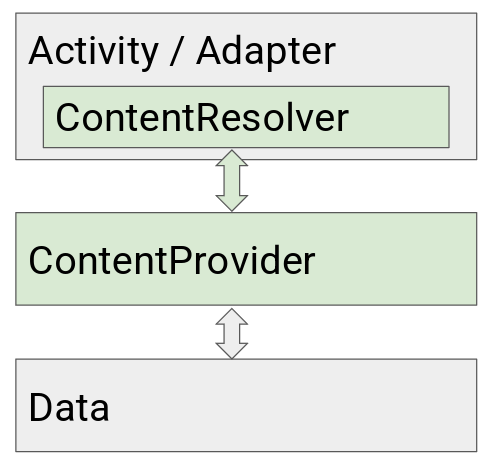
- Activity/Adapter uses
ContentResolverto queryContentProvider. ContentProviderretrieves data.ContentResolverreturns data as aCursor.- Activity/Adapter uses the data.
What Content Providers are good for:
- Securely make data available to other apps.
- Manage access permissions to app data.
- Store data/develop backend independently from UI.
- Standardized way of accessing data.
- Required to work with
CursorLoaders.
Many apps can share one Content Provider - e.g., a Hat Store Content Provider serving both a “red hats” app and a “fancy hats” app via separate ContentResolver queries.
Implementing a Content Provider:
- Data - commonly SQLite.
- Write a contract (public class documenting the API).
- Subclass
ContentProviderand implement methods. - Get data using
ContentResolver. - Set permissions in
AndroidManifest.
Permissions! By default (no permissions set), any other app can read/write your content provider. Always set read/write permissions in
AndroidManifestusing unique tags that include your package name.
ContentResolver:
- Must use
ContentResolverto send queries to the provider. - Data is returned as a
Cursorobject (rows and columns).
9. Mobile App Connectivity
9.a Types of Connectivity
IP-based: GPRS/EDGE/3G/HSDPA/LTE/5G, Wi-Fi, Bluetooth, NFC, Telephony/SMS. Third-party: Zigbee (10–30m), WiMAX (30km).
9.b Android Permissions
<uses-permission android:name="android.permission.INTERNET" />
<uses-permission android:name="android.permission.ACCESS_NETWORK_STATE" />| Protection Level | Granted When | Must Prompt? | Examples |
|---|---|---|---|
| Normal | Install time | No | ACCESS_WIFI_STATE, BLUETOOTH, VIBRATE, INTERNET |
| Signature | Install time | No | N/A |
| Dangerous | Runtime | Yes | GET_ACCOUNTS, CAMERA, CALL_PHONE |
Best practices for dangerous permissions:
- Prompt user when access is needed.
- Explain why the permission is needed.
- Fall back gracefully if user denies.
- Only request permissions your app actually needs.
- Be transparent; make system accesses explicit.
9.c Network Operations
Never on Main Thread! Don’t perform network operations on the main thread →
NetworkOnMainThreadExceptionis thrown.
Best practices for secure network communication:
- Minimize sensitive data transmitted.
- Send all traffic over SSL.
- Consider a Network Security Configuration (custom CAs).
HTTP Clients:
HttpsURLConnection- built-in, supports TLS, streaming, timeouts, IPv6, connection pooling.- Retrofit - turns HTTP API into Kotlin/Java interface; handles JSON/XML parsing.
- OkHttp - industry-standard; HTTP/2, connection pooling, caching.
- Volley - good for downloading files, especially images.
9.d Retrofit
// Gradle
implementation "com.squareup.retrofit2:retrofit:2.9.0"
implementation "com.squareup.retrofit2:converter-moshi:2.9.0"
// Service interface
interface UserService {
@GET("/users/{id}")
suspend fun getUser(@Path("id") id: String): User
}
// Repository
class UserRepository(private val userService: UserService) {
suspend fun getUserById(id: String): User = userService.getUser(id)
}
// Build Retrofit
val retrofit = Retrofit.Builder()
.addConverterFactory(MoshiConverterFactory.create(moshi))
.baseUrl(BASE_URL)
.build()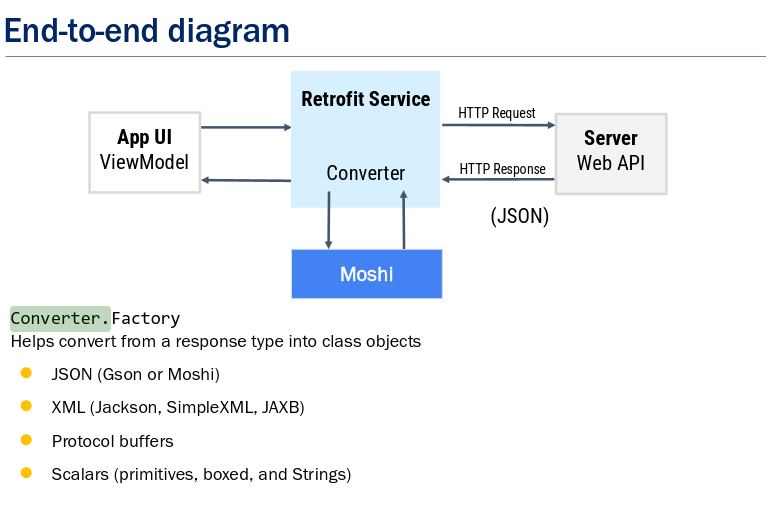
Moshi - JSON library. Configure with Retrofit.Builder().addConverterFactory(MoshiConverterFactory.create(moshi)).
Repository Pattern: Encapsulates network/data operations behind a clean API. Callers don’t need to know how data is stored. Isolates future storage changes.
9.e Surviving Configuration Changes
When the device rotates or the system recreates the Activity, network calls must not restart and UI state must not be lost.
| Mechanism | Purpose |
|---|---|
ViewModel | Survives rotation; holds live data and triggers network calls |
viewModelScope | Network calls launched here survive rotation automatically |
SavedStateHandle | Small UI state that must survive process death (not just rotation) |
LiveData / StateFlow | Observed by UI; receives result regardless of when Activity is recreated |
class UserViewModel(
    private val repo: UserRepository,
    private val savedState: SavedStateHandle
) : ViewModel() {
    val user = liveData {
        emit(repo.getUserById(savedState.get<String>("userId") ?: ""))
    }
}
ViewModelsurvives rotation but NOT process death. UseSavedStateHandle(or the database) for anything that must survive the OS killing the app.
9.f Checking Network State
// Check all networks
val connectivityManager = getSystemService(ConnectivityManager::class.java)
connectivityManager.allNetworks.forEach { network ->
    val caps = connectivityManager.getNetworkCapabilities(network)
    if (caps != null) {
        if (caps.hasTransport(NetworkCapabilities.TRANSPORT_WIFI)) isWifi = true
        if (caps.hasTransport(NetworkCapabilities.TRANSPORT_CELLULAR)) isMobile = true
    }
}

// Check if online (validated internet access)
fun isOnline(): Boolean {
    val cm = getSystemService(ConnectivityManager::class.java)
    val network = cm.activeNetwork ?: return false
    val caps = cm.getNetworkCapabilities(network) ?: return false
    return caps.hasCapability(NET_CAPABILITY_INTERNET) &&
           caps.hasCapability(NET_CAPABILITY_VALIDATED)
}
// NET_CAPABILITY_VALIDATED is essential: a device can be "connected" to Wi-Fi
// but have no real internet (e.g., captive portal requiring login). VALIDATED
// confirms the system has successfully probed the network for internet access.
9.g Listening to Network Events
connectivityManager.registerDefaultNetworkCallback(object : ConnectivityManager.NetworkCallback() {
    override fun onAvailable(network: Network) { /* connected */ }
    override fun onLost(network: Network) { /* disconnected */ }
    override fun onCapabilitiesChanged(network: Network, caps: NetworkCapabilities) { /* changed */ }
    override fun onLinkPropertiesChanged(network: Network, props: LinkProperties) { /* DNS, routes changed */ }
})
API 26+ Note
BroadcastReceiver+CONNECTIVITY_ACTIONis broken in background since API 26.NetworkCallbackis the only correct modern approach. AlwaysunregisterNetworkCallback()inonStop()to avoid leaks.
9.h Preference Library
AndroidX library that renders settings UI and automatically persists values to SharedPreferences.
implementation "androidx.preference:preference-ktx:1.2.1"Built-in Preference Types:
| Type | UI Rendered |
|---|---|
EditTextPreference | Text input dialog |
SwitchPreferenceCompat | Toggle switch |
ListPreference | Radio button list |
CheckBoxPreference | Checkbox |
SeekBarPreference | Slider |
Preference | Clickable item (no value) |
Connection chain:
R.xml.preferences → setPreferencesFromResource() → app:key attribute → Preference object → SharedPreferences (auto-saved)Reading preferences:
val prefs = PreferenceManager.getDefaultSharedPreferences(context)
val url = prefs.getString("server_url", "http://192.168.1.1")
val useHttps = prefs.getBoolean("use_https", false)
Reacting to changes:
override fun onSharedPreferenceChanged(prefs: SharedPreferences?, key: String?) {
    when (key) {
        "server_url" -> { val url = prefs?.getString(key, ""); updateHttpClient(url) }
    }
}
// Register in onResume(), unregister in onPause() to avoid memory leaks!
9.i Managing Network Usage - User Settings
Apps that transfer significant data should offer user controls:
- Toggle for WiFi-only uploads/downloads
- Configurable sync frequency (hourly, daily, manual)
- Option to allow/deny roaming
- Respect Data Saver mode (
restrictBackgroundStatus) - Manual refresh button as fallback
These are surfaced via the Preference Library (see §9.h) and read from SharedPreferences before starting transfers.
9.j Radio State & Network Optimization
AT&T’s Radio State Machine: Radio transitions through IDLE → STANDBY → FULL POWER. Unbundled data (1 second every 18 seconds) keeps the radio perpetually active.
Tricks to reduce battery/radio usage:
- Prefer Wi-Fi over cellular.
- Use greater bandwidth to download more data less often (pre-fetch).
- Bundle requests together.
- Reduce simultaneous connections.
- Close connections rather than waiting for timeout.
- Use event-based rather than polling.
- Handle Data Saver mode (
restrictBackgroundStatus).
10. Dart & Flutter - Part I
10.a Evolution of Dart
| Version | Year | Key Feature |
|---|---|---|
| Dart 1.0 | Nov 2013 | Alternative to JS; Pub package manager |
| Dart 2.0 | Aug 2018 | Strong type system; Sound null safety; Flutter support |
| Dart 3.0 | May 2023 | Null Safety by default; unified dev workflow |
10.b Dart Features
- Platform-independent (Windows, Mac, Linux, Web).
- JIT compilation in development (VM, hot reload); AOT in production (native/JS).
- Auto memory management (Garbage Collection).
- Functions as first-class citizens.
- Sound null safety.
- Object-oriented (encapsulation, inheritance, polymorphism, interfaces, extensions).
- Async/await and concurrency (Isolates).
- Foreign Function Interface (FFI).
- Free and open-source.
10.c Basic Dart Language
Terms:
- Statement - command ending with
; - Expression - evaluated to a single value
- Keyword - reserved word (
int,String,if,for,static,final) - Identifier - name of variable/function/class
- Literal - value written directly in source (
3.14)
Variables:
String firstName = 'John';
var lastName = 'Smith';        // type inference
const pi = 3.14159;            // compile-time constant
final gravity = Gravity();     // set once, object can be mutable
Built-in types: bool, int, double, num (int or double), String, runes, List, Set, Map, Function. All types are object types extending Object.
Immutable types: bool, int, double, String - behave like value types (new object created on operations).
Memory: Garbage collector frees unreferenced heap objects. No free() needed.
User Input (CLI / dart:io):
import 'dart:io';

void main() {
  String? name = stdin.readLineSync(); // returns null if EOF
  if (name != null) {
    print('Hello $name');
  }
}
Comment types:
// Single-line comment
/* Multi-line
   comment */
/// Documentation comment - used by IDEs and doc generators
10.d Lists, Maps, Generics
List<int> myList = [1, 2, 3];
myList.add(4);
myList[0] = 10;
myList.removeAt(0);

Map<String, String> myMap = {'lang': 'Dart', 'client': 'Flutter'};
myMap['store'] = 'Google Play';
myMap.remove('server');
Iterating a Map:
for (var e in myList) { print(e); }

for (var e in myMap.entries) {
  print('${e.key}: ${e.value}');
}
10.e Functions
// Normal function
void add(num num1, num num2) { print(num1 + num2); }

// Arrow function (single expression)
int add(int a, int b) => a + b;

// Optional positional parameter
void sayMessage(String message, [String? author]) { ... }

// Named parameters + default values
void setDimensions({int width = 10, int height = 10}) { ... }

// Generic function
T firstElement<T>(List<T> list) { return list.first; }

// Multiple return values via record
(String, int) userInfo(Map<String, dynamic> json) {
    return (json['name'] as String, json['age'] as int);
}
var (name, age) = userInfo(json); // destructure
Functions as first-class citizens: can be assigned to variables, passed as arguments.
Anonymous (lambda) functions:
myList.forEach((e) { print(e); });
var myList2 = myList.map((e) => e * 2).toList();
10.f Scoping, Closures, and Captured Variables
- Lexical scoping - scope determined at compile time, not runtime.
- Closures capture and retain variables from their lexical scope (even after outer function exits).
- Dart closures in loops capture their own copy of the variable (no “bad closure” issue like JS).
10.g Classes & OOP
class Person {
    String name;
    int age;
    Person({required this.name, required this.age});
    Person.fromMap(Map<String, dynamic> data) : name = data['name'], age = data['age'];
    void displayInfo() { print('Name: $name, Age: $age'); }
}

class Student extends Person {
    String university;
    Student({required super.name, required super.age, required this.university});
    @override
    void displayInfo() { super.displayInfo(); print('University: $university'); }
}
10.h Entering Flutter
Flutter apps are built as a widget tree. Every piece of UI is a widget.
lib/main.dart  ← entry point; calls runApp()
     └─ MaterialApp  ← provides Material Design, routing
          └─ Screen widget
               └─ Child widgets (buttons, images, text…)
Key concepts:
- Every widget has a
build(BuildContext context)method that returns the UI. - Callback functions (e.g.,
onPressed) are passed down as closures. - State changes trigger
build()to re-run onStatefulWidget. - Images, buttons, text are all widgets - compose them rather than subclassing.
void main() {
  runApp(const MyApp());
}

class MyApp extends StatelessWidget {
  const MyApp({super.key});
  @override
  Widget build(BuildContext context) {
    return MaterialApp(home: DiceRoller());
  }
}
11. Dart & Flutter - Part II
11.a final vs const
final | const | |
|---|---|---|
| When set | At runtime, once | At compile time |
| Object mutability | Referenced object can be mutable | Object is compile-time constant (immutable) |
| Memory | New object per instantiation | Canonicalized - only one copy |
| Flutter benefit | - | Const widgets rebuild faster |
final date = DateTime.now();   // OK
const date = DateTime.now();   // ERROR - not compile-time
const pi = 3.14;               // OK
11.b Object vs dynamic
Object- compile-time type safety; only Object methods available.dynamic- bypasses compile-time checks; risks runtime errors.
Object obj = 'Hello';
print(obj.length);          // Compile-time error
print((obj as String).length); // OK

dynamic dyn = 'Hello';
print(dyn.length);          // OK
print(dyn.isEven);          // Runtime error
11.c Operators & Null Safety
Null-aware operators:
int? c;          // nullable
late int d;      // non-nullable, initialized later

str?.length      // prints length if not null, else null
str ?? 'Default' // prints str if not null, else 'Default'
str ??= 'Default' // assigns 'Default' if str is null
str!.length      // tells compiler str is not null (risky!)
Type checking:
if (obj1 is String) { ... }
if (obj2 is! int) { ... }
print(obj1.runtimeType);
Type conversion:
int.parse('1');
1.toString();
pi.toInt();
obj as String;  // parent to child cast
Sound Null Safety: If compiler says a variable is non-nullable, it can never be null at runtime. Benefits: no runtime null checks, faster inline caching, smaller code.
11.d More OOP
Static members: Shared across all instances.
Enums:
enum Status { loading, success, error }
Status status = .loading;
print(status.name);
switch(status) { case .loading: ... }
Abstract Classes: (Dart has no interface keyword; use abstract class instead.)
Annotations: @override, @nonVirtual, @protected, @deprecated.
Extensions: Add methods to existing classes without subclassing.
extension EmailValidator on String {
    bool get isValidEmail => RegExp(r'^...').hasMatch(this);
}
Mixins: Multiple inheritance.
mixin Logger { void log(String message) { ... } }
class OrderProcessor extends Processor with Logger { ... }
11.e Control Flow
Same as C/C++/Java: if, switch, for, while, do-while.
Switch expression (returns a value):
var token = switch (char) {
    '+' || '-' => 'Operator',
    ',' || ';' => 'Punctuation',
    _ => throw FormatException('Invalid character'),
};
Spread, if, for in collection literals:
var combinedList = [
    if (includeOddNumbers) ...numbers.where((n) => n.isOdd),
    for (var n in evenNumbers) n,
];
11.f Coding Conventions
| Element | Convention |
|---|---|
| Variable/function names | lowerCamelCase |
| Class/extension names | UpperCamelCase |
| Package names | snake_case |
| Private identifiers | Leading _: _age |
| Global variables | Leading k: kColorScheme |
| Strings | Prefer single-quoted '...' |
| Unused callback params | _ |
| Imports | dart: first, then alphabetically |
Composition over Inheritance - widgets stay loosely coupled and reusable.
11.g Flutter - Stateless vs. Stateful Widgets
Stateless: No mutable state. build() is called once and does not change.
Stateful: Has mutable state. setState() tells Flutter to re-run build() and update UI.
class CounterWidget extends StatefulWidget {
    const CounterWidget({super.key});
    @override
    _CounterWidgetState createState() => _CounterWidgetState();
}

class _CounterWidgetState extends State<CounterWidget> {
    int _counter = 0;
    void _incrementCounter() {
        setState(() { _counter++; });
    }
    @override
    Widget build(BuildContext context) {
        return Text('Counter: $_counter');
    }
}
Key Insight If a widget’s
build()doesn’t change after creation → StatelessWidget. If it has internal state that can change → StatefulWidget. CallsetState()to trigger UI rebuild.
11.h Quiz App Deep Dive (Part II)
Navigation & State Lifting:
- Lift state up to a shared parent widget (e.g.,
Quiz). - Define a callback that changes state; pass it down as a closure.
Quiz (owns state: activeScreen, answers)
├── StartScreen   ← receives onStart callback
├── QuestionsScreen ← receives onAnswerSelected callback
└── ResultsScreen   ← receives answers list
Flow: child button tap → calls callback → parent runs setState() → parent re-builds with new screen shown.
Data Models: Plain old Dart objects (PODO) - no business logic, just data structure. Can be immutable. Can have getters/setters.
Filtering lists:
final numCorrect = summaryData.where((data) {
    return data['user_answer'] == data['correct_answer'];
}).length;
Image opacity:
Opacitywidget - applies to entire subtree (rendered offscreen first).colorproperty ofImage- GPU-accelerated tint.
Scrolling: Wrap overflow content in SingleChildScrollView + Expanded. Flutter doesn’t auto-scroll or wrap overflowed widgets.
Dev tools: Flutter Inspector (run app in debug mode → open Flutter Inspector in Debug Sessions).
12. Mobile Security
12.a Why Mobile Security Matters
Smartphones store: accounts, files, location history, OTPs, passkeys, photos, work credentials. Connect to untrusted networks. Risks: malware, physical theft, phishing, scam calls, permission abuse, data leakage.
12.b Threat Landscape
- Physical theft - attacker accesses device data/credentials.
- Malicious apps - abuse permissions, exploit vulnerabilities, steal data.
- Sideloading - apps from untrusted sources bypass ecosystem protections.
- Insecure communication - interception, MitM attacks on public networks.
- Social engineering - phishing, fake instructions.
- Outdated systems - unpatched vulnerabilities.
12.c Android Security Philosophy
Android is open but still protects users. It does not rely on a single centralized gatekeeper.
Key Mechanisms Application sandboxing, UID isolation, app signing, and permissions.
- Native code is allowed but runs inside the same application sandbox.
- Key idea: Openness balanced with strong isolation and explicit access control.
12.d Desktop Security vs. Android Security
| Desktop | Android | |
|---|---|---|
| App trust | App gets close to user privileges | App gets its own isolated identity |
| Interactions between apps | Often unrestricted | Must be explicitly allowed by Android |
12.e App Sandbox and UID Isolation
- Every Android app gets a unique User ID (UID).
- Linux kernel enforces separation between app processes and files.
- App A cannot directly read/write App B’s private data.
- System services also run with separated identities.
- The sandbox is the foundation of Android app security.
12.f Android Software Stack Security
Security is distributed across multiple layers:
- Apps interact through framework APIs and system services.
- Runtime, native libraries, HAL, and Linux kernel each contribute.
- Hardware security components handle key management and trusted execution.
- Security is a layered architecture, not a single feature.
12.g Defense-in-Depth
If one protection fails, others still limit the damage.
- Least privilege - apps/processes get only the access they need.
- Isolation and containment - sandbox prevents unauthorized interaction.
- System integrity - boot and runtime protections ensure trusted software.
- User control - permissions, authentication, privacy controls.
12.h Layers of Trust
- Firmware, hardware roots of trust, verified boot.
- OS integrity mechanisms (software not tampered).
- Application integrity (malware prevention, sandboxing, safe APIs, signing).
- User trust (lock screen, auth, biometrics).
- Supply chain security (provisioning, remediation).
12.i SELinux and Mandatory Access Control
Android uses Security-Enhanced Linux (SELinux) system-wide.
- Controls what every process may access (even highly privileged processes).
- Default deny - access blocked unless explicitly allowed.
- Restricts access to files, sockets, system logs, services, other processes.
- Helps contain damage if one component is compromised.
- Separates core Android from vendor-specific components.
12.j Trusted Execution Environment (TEE) and Keystore
- TEE - isolated environment for sensitive operations.
- Main Android OS is treated as less trusted than the TEE.
- Android Keystore - generates, stores, and uses cryptographic keys in hardware-backed environments.
- Key material does not leave the secure environment.
- Supports: encryption, decryption, signing, auth, biometrics, key attestation.
Key Idea Apps request cryptographic operations but do not directly receive the secret key.
StrongBox - keys in a dedicated, tamper-resistant security chip. Key Attestation - cryptographic proof about the key and device state. Version Binding - ties key validity to OS version or security patch level. These protect against key extraction, fake device identity, and downgrade attacks.
12.k File-Based Encryption (FBE)
- Different directories can use different keys.
- Device Encrypted (DE) storage - available after boot, before unlock.
- Credential Encrypted (CE) storage - available only after user authentication.
- CE keys protected by lock screen credentials + hardware-backed anti-brute-force.
- Metadata encryption - protects file sizes, directory layout, timestamps.
12.l App Signing
- Every Android app must be digitally signed.
- Signature identifies the author and verifies the app hasn’t been modified.
- Updates only allowed when signing lineage proves continuity from original developer.
- Signature-based permissions - controlled sharing between apps with a common signer.
- Google Play App Signing - manages keys, key upgrades, key rotation.
Developer Note Signing is not just a publishing step - it is part of Android’s trust and update model.
12.m Runtime Permissions
- Apps cannot perform sensitive actions without explicit permission.
- Permissions are requested when access is needed (not only at install time).
- Users choose: “while using the app” / “only this time” / “don’t allow”.
- Sensitive examples: location, camera, microphone, contacts, SMS, storage, sensors.
12.n Privacy Evolution
- Approximate location, one-time permissions, permission auto-reset.
- Background location restrictions.
- Foreground restrictions on background camera/microphone/sensor access.
- Privacy indicators and dashboard.
- Scoped storage - limits broad file access, reduces data leakage.
12.o Network Traffic Security
Protections: TLS by default, DNS over TLS/HTTPS, certificate management, MAC randomization.
VPN:
- Per-app VPN - routes only selected work apps through the tunnel.
- Full-device VPN - all traffic through tunnel (corporate-owned devices).
- VPN lockdown - prevents traffic leaking when tunnel is inactive.
12.p Memory Safety
- Memory safety bugs in C/C++ are a major source of vulnerabilities.
- Android introduced Rust for platform development (memory + thread safety, C/C++ performance).
- Mitigations: MTE, CFI, ASLR/KASLR, UBSan, Scudo, GWP-ASan, KFENCE.
- These make exploitation harder and detect memory corruption.
12.q Google Play Protect and App Review
- Google Play Protect - scans apps for malware and harmful behavior (Play and sideloaded apps).
- Play Integrity API - lets backends verify requests come from genuine apps on trusted devices.
- App review, developer vetting, policy enforcement.
- App Defense Alliance - shared threat intelligence across ecosystem.
12.r Security Updates
- Android Security Bulletins - monthly fixes.
- Project Treble - separates framework and vendor concerns to accelerate fix delivery.
- Google Play System Updates - update modular system components without a full OS upgrade.
- Enterprise can enforce patch-level requirements and block outdated devices.
13. Quick Reference - Exam Tips
What to Know Cold
- Activity lifecycle callbacks in order -
onCreate → onStart → onResume → onPause → onStop → onDestroy- Fragment extra callbacks -
onAttach / onCreateView / onViewCreated / onDestroyView / onDetach- Room annotations -
@Entity,@PrimaryKey,@ColumnInfo,@Dao,@Database,@Query,@Insert,@Update,@Delete- Coroutine Dispatchers - Main (UI), IO (network/disk), Default (CPU)
- Broadcast Receiver - responds in 5 seconds;
onReceive()only- Service types - started (stopSelf/stopService) vs. bound (clients unbind)
- Notification building -
NotificationCompat.Builder+NotificationManager.notify()- Content Provider - needs ContentResolver; returns Cursor; permissions needed
- Dangerous permissions - must prompt user at runtime
- Null safety in Dart -
?nullable,!force-unwrap,??default,??=assign if null- StatefulWidget - needs
setState()to update UI- Android Security layers - sandbox + UID isolation + signing + permissions + SELinux + TEE + FBE
Key Comparisons for MCQ
| Feature | Activity | Fragment |
|---|---|---|
| UI creation callback | onCreate() | onCreateView() |
| View setup | - | onViewCreated() |
| Attach to host | - | onAttach() / onDetach() |
| Save state | onSaveInstanceState() | onSaveInstanceState() |
| Service Type | Start Method | End Method |
|---|---|---|
| Started | startService() | stopSelf() / stopService() |
| Bound | bindService() | All clients unbind |
| Security Feature | Purpose |
|---|---|
| App Sandbox + UID | Isolate apps from each other |
| SELinux | Default deny MAC for all processes |
| TEE + Keystore | Hardware-protected keys |
| FBE (DE/CE) | Per-user data encryption |
| App Signing | Author verification + update trust |
| Runtime Permissions | Least privilege for sensitive access |
References
- Android Developer Fundamentals (ADF) - google-developer-training.gitbooks.io
- Android Development with Kotlin - Google Developer Training (Apache 2 License)
- Flutter/Dart Documentation - flutter.dev, dart.dev
- IF3210 Lecture Slides - Hari Purnama (ITB), Tim Dosen IF3210
- Material from Shan-Hung Wu, CS, NTHU (Flutter/Dart slides)